Integrating with Argo CD
Argo CD supports a variety of integrations with external systems to improve the user experience. Here are some integrations you can enable to improve your Argo CD experience while using GitOps Promoter.
New to GitOps Promoter with Argo CD and GitHub? Start with the Tutorial for a full walkthrough.
To build or test the UI extension locally, see Developing the Argo CD Extension in Contributing.
UI Extension
GitOps Promoter provides a custom Argo CD UI Extension.
An easy way to install the extension is to use the argocd-extension-installer.
You can use it by adding an init container to your argocd-server deployment. Here is an example:
# argocd-server-extension-patch.yaml
apiVersion: apps/v1
kind: Deployment
metadata:
  name: argocd-server
spec:
  template:
    spec:
      initContainers:
        - name: extension-gitops-promoter
          image: quay.io/argoprojlabs/argocd-extension-installer:v0.0.9@sha256:d2b43c18ac1401f579f6d27878f45e253d1e3f30287471ae74e6a4315ceb0611
          env:
            - name: EXTENSION_NAME
              value: gitops-promoter
            - name: EXTENSION_URL
              value: https://github.com/argoproj-labs/gitops-promoter/releases/download/v0.31.1/gitops-promoter-argocd-extension.tar.gz
            - name: EXTENSION_CHECKSUM_URL
              value: https://github.com/argoproj-labs/gitops-promoter/releases/download/v0.31.1/gitops-promoter_0.31.1_checksums.txt
          volumeMounts:
            - name: extensions
              mountPath: /tmp/extensions/
          securityContext:
            runAsUser: 1000
            allowPrivilegeEscalation: false
      containers:
        - name: argocd-server
          volumeMounts:
            - name: extensions
              mountPath: /tmp/extensions/
      volumes:
        - name: extensions
          emptyDir: {}
You can apply the patch using the following command:
kubectl patch deployment argocd-server -n argocd --patch-file argocd-server-extension-patch.yaml
Using the Argo CD Helm Chart
If you are using the official Argo CD Helm chart, add the
following to your values.yaml:
server:
  initContainers:
    - name: extension-gitops-promoter
      image: quay.io/argoprojlabs/argocd-extension-installer:v0.0.9@sha256:d2b43c18ac1401f579f6d27878f45e253d1e3f30287471ae74e6a4315ceb0611
      env:
        - name: EXTENSION_NAME
          value: gitops-promoter
        - name: EXTENSION_URL
          value: https://github.com/argoproj-labs/gitops-promoter/releases/download/v0.31.1/gitops-promoter-argocd-extension.tar.gz
        - name: EXTENSION_CHECKSUM_URL
          value: https://github.com/argoproj-labs/gitops-promoter/releases/download/v0.31.1/gitops-promoter_0.31.1_checksums.txt
      volumeMounts:
        - name: extensions
          mountPath: /tmp/extensions/
      securityContext:
        runAsUser: 1000
        allowPrivilegeEscalation: false
  volumeMounts:
    - name: extensions
      mountPath: /tmp/extensions/
  volumes:
    - name: extensions
      emptyDir: {}
Note
In order to see gitops-promoter CRDs and promoter UI in the ArgoCD UI, they must be deployed in an ArgoCD application
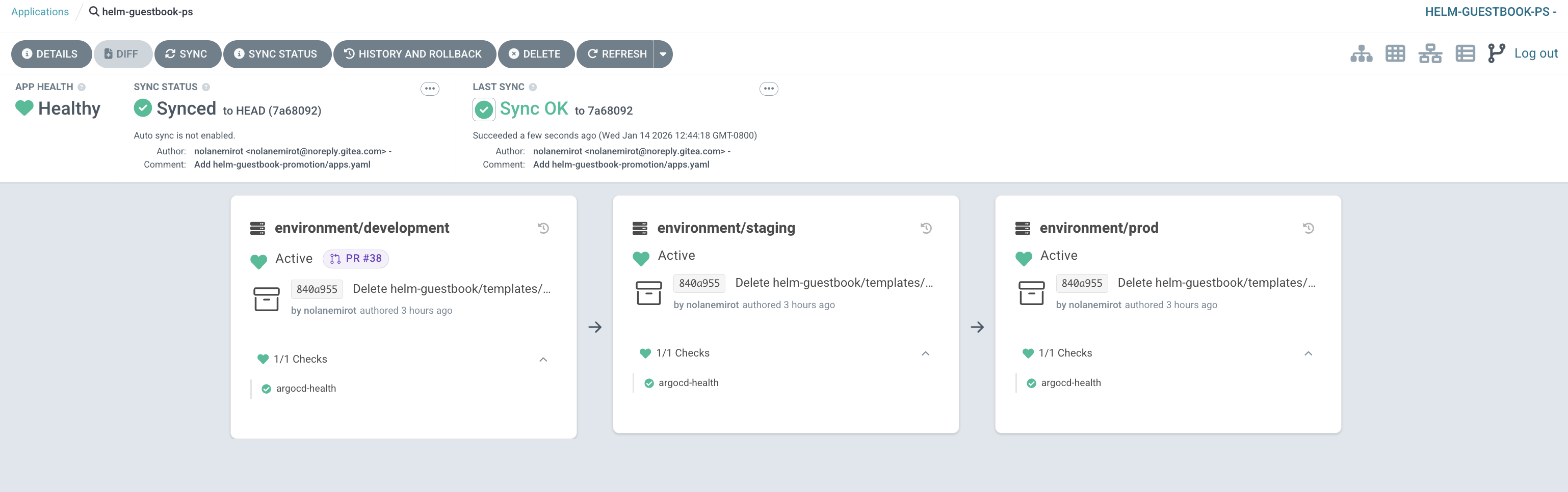
Once applied, you should see a new gitops-promoter section in the Argo CD UI
Compatibility Matrix
The following table shows the compatibility between GitOps Promoter versions and Argo CD versions for the UI Extension:
| GitOps Promoter Version | Argo CD Version |
|---|---|
| v0.18.3+ | v2.3+ |
| v0.18.2 and earlier | v2.2.x and earlier |
Extension Discovery
The extension tab appears on an Argo CD Application when either of the following is true:
- Auto-detection (default): The extension checks the Application's top-level resource tree for
PromotionStrategyresources. If at least one is found, the tab is shown. - Label-based: The Application has the label
promoter.argoproj.io/has-promotionstrategyset to"true". Use this when the PromotionStrategy is not top-level, i.e. it is a child of another resource.
Use the label if your PromotionStrategy resources are nested or if you want explicit control over which Applications display the extension tab:
apiVersion: argoproj.io/v1alpha1
kind: Application
metadata:
  labels:
    promoter.argoproj.io/has-promotionstrategy: "true"
Linking from Pull Requests
You can link to the extension view by constructing the URL from PromotionStrategy metadata:
apiVersion: promoter.argoproj.io/v1alpha1
kind: ControllerConfiguration
spec:
  pullRequest:
    template:
      description: |
        ...

        {{- with .PromotionStrategy }}
        {{- $promoURL := urlParse "https://argocd.example.com" }}
        {{- $promoTrackID := index .Annotations "argocd.argoproj.io/tracking-id" }}
        {{- if $promoTrackID }}
        {{- $promoApp := index (splitList ":" $promoTrackID) 0 }}
        {{- $promoQuery := printf "promotionstrategy=%s%%2F%s" .Namespace .Name }}
        {{- $promoRawQuery := join "&" (list "resource=" "view=GitOps+Promoter" $promoQuery) }}
        {{- $_ := set $promoURL "path" (printf "/applications/%s" $promoApp) }}
        {{- $_ = set $promoURL "query" $promoRawQuery }}
        [View PromotionStrategy in Argo CD]({{ urlJoin $promoURL }})
        {{- end }}
        {{- end }}
Deep Links
Argo CD supports deep links from a resource's details page. This allows us to link directly from a ChangeTransferPolicy or a PullRequest to the PR page in your SCM provider.
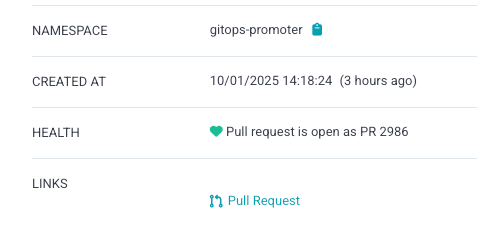
To enable these deep links, add the following to your argocd-cm ConfigMap:
  resource.links: |
    - url: '{{.resource.status.url}}'
      title: Pull Request
      icon.class: fa-code-pull-request
      if: resource.apiVersion == "promoter.argoproj.io/v1alpha1" && resource.kind == "PullRequest" && resource.status.url != nil && resource.status.url != ""
    - url: '{{.resource.status.pullRequest.url}}'
      title: Pull Request
      icon.class: fa-code-pull-request
      if: resource.apiVersion == "promoter.argoproj.io/v1alpha1" && resource.kind == "ChangeTransferPolicy" && resource.status.pullRequest != nil && resource.status.pullRequest.url != nil && resource.status.pullRequest.url != ""
Using the Argo CD Helm Chart
If you are using the official Argo CD Helm chart, add the
following to your values.yaml:
configs:
  cm:
    resource.links: |
      - url: '{{.resource.status.url}}'
        title: Pull Request
        icon.class: fa-code-pull-request
        if: resource.apiVersion == "promoter.argoproj.io/v1alpha1" && resource.kind == "PullRequest" && resource.status.url != nil && resource.status.url != ""
      - url: '{{.resource.status.pullRequest.url}}'
        title: Pull Request
        icon.class: fa-code-pull-request
        if: resource.apiVersion == "promoter.argoproj.io/v1alpha1" && resource.kind == "ChangeTransferPolicy" && resource.status.pullRequest != nil && resource.status.pullRequest.url != nil && resource.status.pullRequest.url != ""
Commit Status Keys in Resource Tree
Argo CD supports showing values of specific labels in the resource tree.
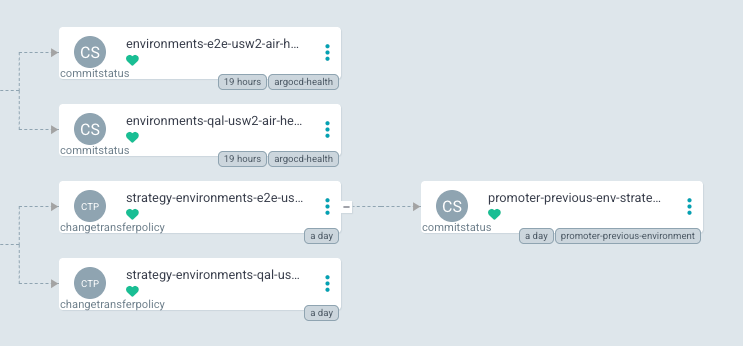
To enable this, add the following to your argocd-cm ConfigMap:
resource.customLabels: promoter.argoproj.io/commit-status
Using the Argo CD Helm Chart
If you are using the official Argo CD Helm chart, add the
following to your values.yaml:
configs:
  cm:
    resource.customLabels: promoter.argoproj.io/commit-status